

ZVBox
Configuration
ZVBox
Configuration

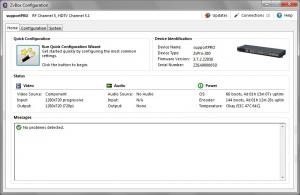
All ZvBoxes can be configured using ZvConfig and ZvCli - powerful software applications that run on a PC and connect to ZvBox via a USB cable.
ZvBox 170 and ZvBox 180 feature a front-panel display and allow for broad configuration without needing a PC.
ZvBox 160 offers a simple way to set the broadcast channel via a single front-panel button.
Configuring a ZvBox can be as simple as changing the RF channel used for broadcast, or as powerful as associating audio ports with video ports and controlling how video gets processed and broadcast.
- ZvConfig™ is an easy to use graphical interface that uses wizards and well laid-out settings to make set up simple.
- ZvCli™ is a command-line interface that offers the same powerful commands that are available on the serial port of the ZvPro 280. It also offers batch processing.
Either application offers the ability to upgrade firmware, perform cable scans, and easily configure large deployments.
IMPORTANT NOTE – ZeeVee is constantly updating functionality and upgrading video performance, so we recommend using either ZvConfig or ZvCli to update the firmware on any new ZvBox product. This is the best way to get started with the best possible experience.
ZvConfig Features:
- Multi ZvBox Management - allows you connect multiple ZvBoxes to a single PC at once, an important component for remote management and monitoring
- Offline Firmware Update - can now load firmware to all products via a stored file
- QAM64 Modulation for all products
- Split Audio for ZvPro 280

EXAMPLE FUNCTIONS THAT CAN BE PERFORMED
Status Commands
- Show System Status
- Show Audio / Video Status
- Show Configuration
- Analyze Current Configuration and Status
RF, Cable and Broadcast Commands
- Cable Scan
- Show Last Cable Scan Results
- Turn RF Output On/Off
- Set RF Channel
- Set Cable Plan
- Set RF Output Power
Audio Input Commands
- Associate Audio Input to Video Input
Video Input Commands
- Select Active Video Source
- Video Calibration
Setting Program Information
- Set Channel Name
- Set HDTV Channel Number
- Set Event Information Table (EIT) Name
- Set EIT Rating
MPEG2 Encoding Control
- Set Encoding Bit Rate
- Visual Watermark
Advanced MPEG2 and Transport Commands
- Set DC coefficient precision
- Set Program Number
- Set Packet Identifier (PID)
System Maintenance Commands
- Software Download
- Configuration Script read / write
- Send Troubleshooting Report
Miscellaneous Commands
- Transmit IR Codes for Learning
- Set Date
- Set Management Mode
- Reset to Factory Defaults
- Reboot ZvBox
- Restart Video Processing
or